Search...
1. Setup & Connection
Prepare and Tag Shopify Products for 3D Visualisation
Learn how to tag your products, set up images and dimensions, and prepare your Shopify catalogue visualisation.
In 3D visualisation, scale is everything. A customer needs to know if that sofa actually fits in their living room. Use this section to fine-tune the physical dimensions (Height, Width, Depth) of your models to ensure 'What they see is exactly what they get."
How it Works (Automatic Extraction)
The simplest way to configure your 3D models is to let Imersian do the work. Our system automatically scans your Shopify Product Descriptions and Variant Titles to extract size information.
Required Information
To ensure smooth auto-extraction, please ensure your Shopify products have:
Product Dimensions: (Width, Height, Depth) included in the text. (Note for Rugs: Height = Pile Height)
Clear Product Titles: Descriptive names help the AI understand the item type.
Product Variants: If you have different sizes or colours, ensure they are set up as Variants in Shopify.
imersianvisualiserenabledtag on your product
Dimensions guidelines in Shopify product listing
We recommend formatting your data in Shopify as follows:
For Rugs & Variants (Best Practice)
Include the size directly in the Variant Title.
Format:
120 x 180 cm
For Furniture (Single Items)
Include the dimensions in the Variant Title or Product Description.
Format:
80 W x 45 H x 60 D cmNote: Always ensure you include the unit label (cm, mm, or ft).
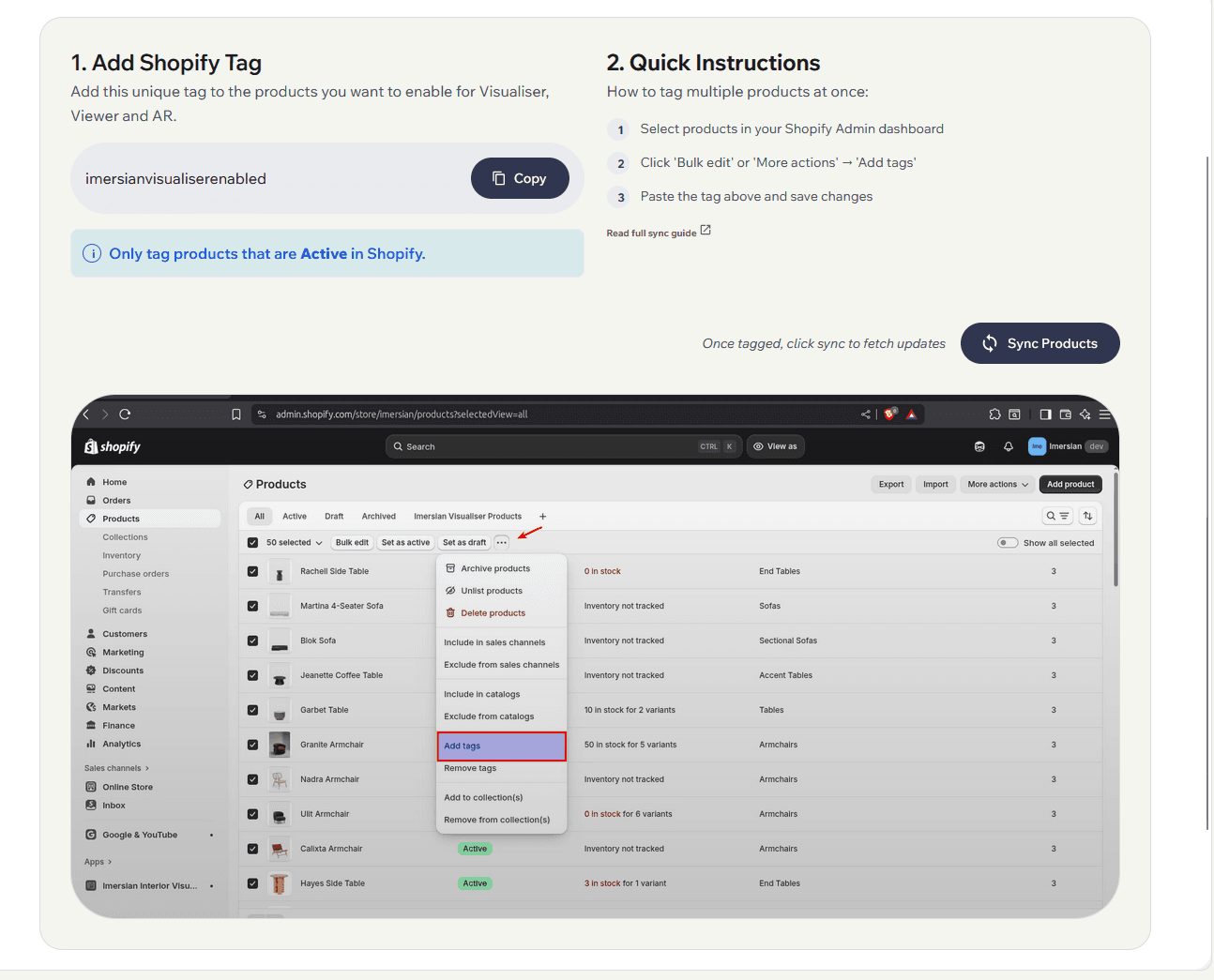
The Manual Override
If you do not wish to display sizes publicly on your Shopify store, or if the auto-extraction missed a unique format, you can manually set or override sizes inside the Imersian Portal after the Sync.
Important: This must be done before you click "Generate 3D."
Best Practices
✅ Do:
Include accurate dimensions for every product.
Use clear, descriptive product titles.
Provide detailed product descriptions with clearly labeled units (cm/ft).
Keep product information up to date in Shopify.
❌ Don't:
Leave dimension fields empty.
Use vague or incomplete titles.
Forget to update product information if the physical product specs change.